
My Phone Just Stopped Saving My Life: The Scary Red Warning
We have all been there. You are right in the middle of a perfect moment—maybe a birthday party or a stunning vacation sunset—you pull out your phone to take a picture, and boom. "Cloud Storage Full." Your camera refuses to work, and suddenly you are desperately deleting old memes just to take one single photo. If you are tired of this annoying red warning hijacking your phone, I am going to show you exactly how to fix your storage issues right now without spending hours scrolling through old pictures.
This is a feeling many of us know too well. We live our lives through our lenses. We take photos of our food, our pets, and our families. But we rarely think about where those 1's and 0's go. When that invisible bucket in the sky gets full, things get messy very fast. It is not just about not being able to take a new photo. It is about a total breakdown of your digital ecosystem.
I spent the next hour of that wedding trying to delete old memes just to save one photo of the bride. I missed the speech. I missed the laughter. I was staring at a screen instead of living the moment. That was the day I decided to learn exactly how these cloud systems work. I wanted to know what happens to my old photos and why everything else stops working when that limit hits.
Quick Fixes for a Full Cloud:
- Empty the Trash: Deleted photos stay in your hidden trash folder for 30 days and still eat up space. Empty it right now!
- Target the Big Guys: A single 4K video takes up more room than hundreds of pictures. Delete long videos first.
- Check Your Email: If your cloud is totally full, your linked email accounts might stop receiving new messages.
- Turn off Auto-Save: Stop chat apps like WhatsApp from automatically saving every random meme to your main camera roll.
The Mental Burden of a Full Digital Trash Can
When you see that "99% used" notification, it creates a weird kind of stress. You start looking at your photos differently. Instead of memories, they become "space takers." You feel a heavy weight every time you open your gallery. You ask yourself, "Do I really need this photo of my lunch from three years ago?"
The Instant Death of Automatic Syncing
The very first thing that happens when you hit your limit is that syncing dies. This is the invisible thread that keeps your phone and your computer talking to each other. When you reach 100% capacity, the cloud says "No more."
You might take a photo on your phone, but it stays only on your phone. If you go to your laptop to show someone that photo, it won't be there. This break in the chain is dangerous. Most of us rely on the cloud to keep our files safe. Without syncing, your photos are sitting in a very fragile place. If your phone falls in water or gets stolen, those unsynced photos are gone. There is no "undo" button for a broken sync.
Myth vs. Reality: The Backup Illusion
- The Big Myth: Deleting photos from my phone gallery frees up my cloud space.
- The Reality: If your phone and cloud are actively synced, deleting a photo from your gallery will often delete it from the cloud too! Always check your app settings before mass-deleting to avoid losing your memories forever.
Why Your Emails Suddenly Stop Arriving
Many people don't realize that companies like Google share storage across different services. This was a huge shock to me. When my Google Photos got full, my Gmail stopped working too. I didn't get a job interview email because my inbox was "blocked" by my large 4K videos.

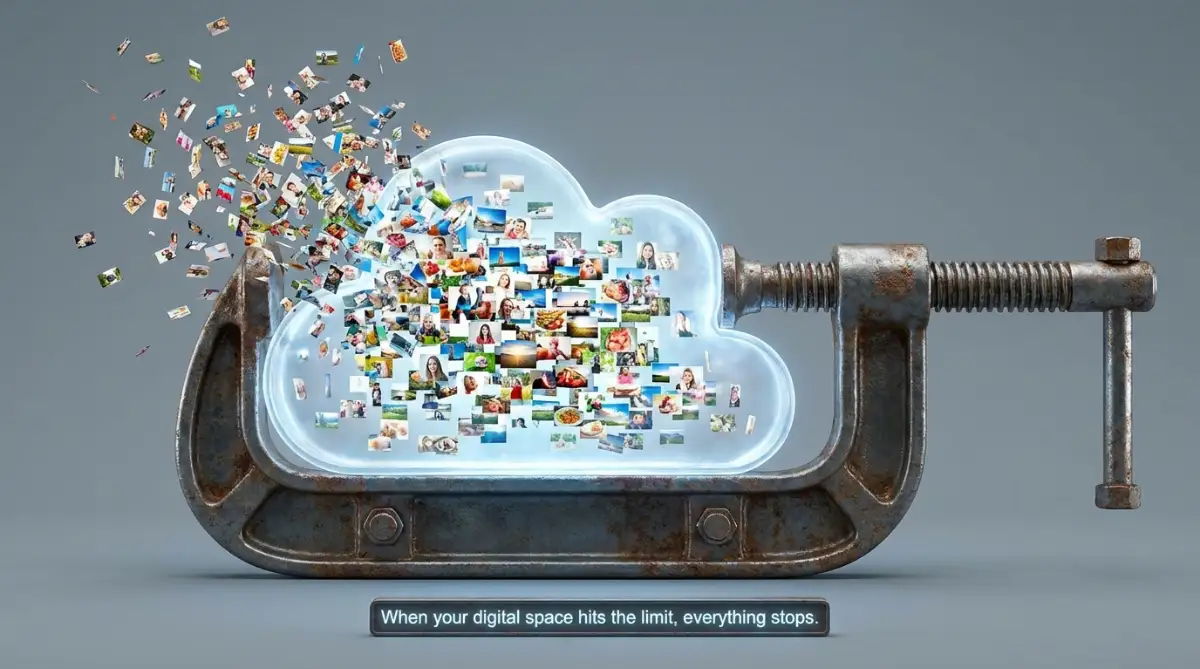
When the storage hits the ceiling, the whole house stops functioning. Your "cloud" is often one big box. If photos fill up the box, there is no room for emails or documents. You might send an email, but you won't receive any. People will get a "bounce back" message saying your inbox is full. This can lead to missed opportunities and lost connections in your professional life.
The Invisible Risk to Your Existing Photo Library
A lot of people ask me, "Will the cloud delete my old photos if I don't pay for more space?" The short answer is usually no, but there is a catch. Most services like iCloud or Google Photos will keep your old photos safe for a while. However, they won't let you edit them or organize them easily.
The real risk is accidental deletion. When we are panicked and trying to make space, we start deleting things rapidly. In that rush, I have seen people delete precious videos of their children or grand-parents. When the storage is full, the system becomes slow and laggy. Sometimes you think you deleted one photo, but the system glitches and deletes a whole album.
How Different Devices React to the Storage Wall
Your phone doesn't just stop taking photos; it starts acting weird. Since it can't move files to the cloud, it has to keep everything on its internal memory. This fills up your phone's physical storage.
Once your physical storage is also full, your apps will start crashing. Your phone might get hot. You might find that you can't even open your camera app. It is a domino effect. One full cloud leads to a full phone, which leads to a broken device. I have seen phones get stuck in a "boot loop" because the memory was so full the operating system couldn't even start up.
Pro Tip: I used to think that "Optimizing Storage" on my iPhone would solve everything forever. I realized later that it only works if you have enough cloud space to hold the original files. If your cloud is full, the optimization stops, and your phone's memory will fill up even faster. Always check your cloud status before your phone starts lagging!
The Science Behind Data Compression and Storage
Why do photos take up so much space anyway? Modern smartphones take incredible high-resolution images. Each photo can be 5 to 10 megabytes. If you take 4K videos, you are eating gigabytes of data every few minutes.
Cloud companies use complex math to store your data. When your storage is full, they can't create new "indices" for your files. Think of it like a library. If the shelves are full, the librarian can't even write down the names of new books. The system needs "breathing room" to move data around and keep things fast. Without that 5% of free space, the whole database becomes inefficient.
The Secret "Data Hog" Table
Wondering what is actually eating your storage? Here is a quick breakdown of what typical files cost you:
- 1 Minute of 4K Video: ~400 Megabytes (This is the real space killer!)
- 1 ProRAW Photo: ~25 Megabytes
- 1 Regular Photo: ~3 Megabytes
- 100 WhatsApp Memes: ~150 Megabytes
Identifying the Hidden "Space Hogs"
Not all files are created equal. You might think it is your photos, but often it is the "hidden" files that push you over the edge.
- WhatsApp Backups: This is a huge one. Every funny video someone sends you is likely being backed up to your cloud.
- Burst Photos: Did you know that when you hold the shutter button, your phone takes 20 photos in one second? If you don't pick one, all 20 stay in your cloud.
- Screen Recordings: These files are massive. A five-minute screen recording can be larger than 500 photos.
- Raw Files: If you are a pro-user and shoot in "RAW" or "ProRAW" mode, your photos are 10 times larger than normal ones.
Check out this visual guide on how to spot these hidden files:
Want to see exactly where your storage went? Watch this simple walkthrough to find the hidden folders that are stealing your space.
The Truth About the "Trash" Folder
When you delete a photo to make space, it doesn't actually disappear. Most services move it to a "Trash" or "Recently Deleted" folder. These photos still count toward your storage limit for 30 days!
I see people delete 1,000 photos and then wonder why their storage is still full. You have to go into the trash folder and "Empty" it manually to see an immediate change. This is a safety feature to prevent permanent loss, but it can be very confusing when you are in a hurry.
Why "Free" Storage isn't Really Free Anymore
Years ago, some companies offered unlimited photo storage. Those days are gone. Now, every byte is tracked. The "free" 15GB or 5GB you get is just a starter pack. It is designed to get you used to the service. Once you are hooked and your life is stored there, the limit hits.
This is a psychological tactic. You are more likely to pay for a subscription than to spend hours deleting memories. Understanding this helps you make a better decision. Do you want to pay for the convenience, or do you want to become your own digital librarian?
The Laggy User Interface Experience
Have you noticed your gallery app taking forever to load thumbnails? This often happens when the cloud is full. The app is constantly trying to "call home" to the server, but the server is saying "No." This communication loop uses up your battery and makes your phone feel old.
When I cleared my storage, my phone suddenly felt brand new again. The apps opened faster, and the camera didn't lag. It wasn't the phone's fault; it was the data traffic jam in the cloud.
Comparing Your Options: Where Should Your Data Go?
When you hit that wall, you have three main paths. Each has its own logic and scientific benefit.
Most people choose the upgrade because it is the path of least resistance. But if you are like me and want to save money, the manual cleaning path is better in the long run.
The Role of Artificial Intelligence in Managing Space
Modern cloud services are using AI to help you. They can now find "Blurry Photos" or "Duplicate Images" for you. This is a massive help. Instead of looking at every photo, you can let the AI show you what is safe to delete.
However, you should not trust AI 100%. Sometimes a "blurry" photo is actually an artistic shot you love. Always double-check the suggestions before hitting that "Delete All" button.
Moving Forward: How to Stay Below the Limit
The best way to handle a full cloud is to never let it get full in the first place. I started a habit called "The Sunday Swipe." Every Sunday, I spend 5 minutes deleting the junk from my week. I delete screenshots, accidental pocket photos, and duplicate videos.

This small habit has kept me away from that scary red warning for over a year now. It feels good to have a clean digital home. It makes my memories feel more valuable because they aren't buried under a mountain of digital trash.
Understanding the Terms of Service (The Fine Print)
Did you know that some services can delete your account if it stays over the limit for too long? It is usually in the small text we never read. If you are over your limit for 2 years, Google might actually start deleting your content to bring you back under the limit.
This is why ignoring the notifications is a bad idea. It is not just about new photos; it is about protecting what you already have. Your cloud storage is a contract. If you don't follow the rules of the storage limit, the provider has the right to manage your data for you—and you might not like how they do it.
Final Thoughts for Part 1
Hitting your maximum cloud storage capacity is more than just a tech issue. It is a moment where your digital life stops growing. From blocked emails to the risk of losing precious memories, the consequences are real. But by understanding how the system works—from the trash folder to data compression—you can take control.
In the next part, we will look at more advanced ways to move your data and how to build a storage system that never fails you again. Don't let a red warning light ruin your next big moment. Stay organized, stay backed up, and keep your memories safe.
Smart Ways to Manage Your Digital Space Like a Pro
Now that we understand the chaos a full cloud can cause, let’s talk about how to actually fix it. You don't always need to open your wallet and pay for more space. Sometimes, you just need a better plan for your data.
One of the smartest things I ever did was to separate my "active" photos from my "archive" photos. Active photos are things I might want to show friends today, like pictures from last weekend. Archive photos are memories from five years ago that I want to keep forever but don't need on my phone every second.
I started moving my older photos to a physical hard drive once every few months. This keeps my cloud light and fast. It also gives me a physical copy of my life that doesn't depend on a monthly subscription. You can find great advice on keeping your hardware safe in this guide on smart home security and locking down your devices.
Another pro secret is to use the "Search" bar in your photo app to find space-wasters. Type in words like "Video" or "Screenshot" or even "Blurry." You will be shocked at how many gigabytes are taken up by accidental videos of the inside of your pocket.
If you travel a lot, you might be tempted to upload everything while sitting at an airport. But be careful with those free connections. I always recommend learning how to stay safe on public Wi-Fi before you start syncing your entire life to the cloud. A hacked cloud account is much worse than a full one.
You should also check your "Shared Albums." Sometimes, when friends add you to a massive album of 500 wedding photos, it can eat into your space if you aren't careful. Go through those albums and only save the five or ten photos that actually have you in them.
Think about the quality of the photos you are saving. Most modern phones have a setting for "High Efficiency" formats. These files are much smaller but look just as good. Switching to this setting today will save you a lot of space in the coming months.
I also suggest checking your "Large Files" section in your storage settings. Most phones now have a dedicated button that shows you exactly which ten videos are taking up 50% of your space. Deleting just those ten items can give you enough room to breathe for another month.
If you are worried about losing your phone or having it stop working while you clean your storage, you need to act fast. If you ever have a hardware emergency, like if you dropped your phone in water, you will wish you had sorted your cloud storage sooner. Having a clean, synced cloud is the only way to get your photos back after an accident.
Long-term digital health is about habits, not just one-time fixes. I set a timer on my phone for ten minutes every Friday. I use that time to delete the junk I took during the week. This keeps the "Storage Full" monster away from my door forever.

Danger Zones: What Most People Get Wrong About Storage
The biggest mistake I see people make is thinking that "Sync" and "Backup" are the same thing. They are very different. If you have "Sync" turned on and you delete a photo from your phone to save space, the cloud will delete it too!
I have talked to so many people who cried because they thought their photos were safe in the cloud. They deleted them from their phone gallery and realized too late that they were gone everywhere. This is a heartbreaking error that is so easy to avoid.
Another trap is the "Unlimited" promise. Some smaller companies offer free, unlimited storage, but these services often close down without much warning. If a deal sounds too good to be true, it probably is. Always stick with the big, trusted names that follow standard open source software architecture and data rules.
According to a study on digital data preservation by Harvard University, keeping your data in only one place is the fastest way to lose it. This is called the "Single Point of Failure." If you only use one cloud provider, you are at their mercy.
Many people also forget to check their "Hidden" or "Trash" folders. They spend an hour deleting photos but don't see the storage meter move. That is because the phone is holding onto those photos for 30 days just in case. You must manually empty the trash to actually get your space back.
I also see people panic and buy the most expensive storage plan the moment they see a warning. Don't do that. Most of the time, you only need to delete a few long 4K videos to fix the problem. Don't let the "Storage Full" notification scare you into a monthly bill you don't really need.
One very dangerous mistake is using your cloud account for everything without extra security. If your storage is full, you might be distracted and miss security alerts. If someone gets into your account, they have your photos, your emails, and your documents. Always use two-factor authentication to keep your digital house locked tight.
For those who work online, a full cloud can even hurt your job. If you are a digital nomad or work with people across the globe, you can't afford to have your email stop working. You can read more about working with global clients and how important it is to keep your communication tools running smoothly.
Lastly, don't ignore the "Optimize Storage" setting on your device. Some people turn it off because they want the full-size photo on their phone. While that is nice, it is the fastest way to fill up your physical memory. Let the cloud hold the heavy files and let your phone hold the lightweight previews.
Your New Digital Freedom Starts Now
I want you to think of your cloud as a treasure chest, not a trash can. If you fill it with junk, you will never find the gems. By being a little more selective about what you keep, you make your real memories stand out even more.
Take a look at your phone right now. Find five photos you don't need and delete them. That small step is the beginning of a much bigger journey toward digital peace. You don't have to be a tech genius to master your storage; you just have to be consistent.
My own life changed when I stopped fighting with my phone and started managing it. I no longer miss the big moments because of a red warning box. I feel lighter knowing that my photos are safe and my inbox is open for new opportunities. I really hope you take a few minutes today to clear some space, because you deserve the peace of mind that comes with a perfectly organized digital life.
Common Questions About Full Cloud Storage
Will I lose my old photos if I don't pay for more space?
No, your existing photos are usually safe. However, you won't be able to add new ones, and your email or other connected services might stop working. It is like a library that stops taking new books but keeps the old ones on the shelf.
Why is my storage still full after I deleted everything?
You probably forgot to empty the "Trash" or "Recently Deleted" folder. Most cloud services wait 30 days before truly removing files. To see the space immediately, you must go into the trash and hit "Empty Now."
Can a full cloud make my phone slow?
Yes, it definitely can. Your phone needs a little bit of free space to perform daily tasks and move data around. When everything is packed to the limit, your apps might lag or crash more often.
What is the fastest way to clear 1GB of space?
The quickest way is to find and delete long videos. A single 5-minute video in high resolution can take up more space than hundreds of photos. Check your "Videos" folder first for the fastest results.
Is it safe to use two different cloud services?
It is actually a very good idea! This is called "redundancy." Having your photos in two different places means that if one service has a problem, your memories are still safe in the other one.
Disclaimer: This article is for informational purposes only. While we provide tips on managing digital data and cloud storage, we are not responsible for any data loss that may occur during your manual cleaning or syncing processes. Always ensure you have a primary backup before deleting important files. For specific technical support, please refer to the official help pages of your service provider, such as Google Photos Help or Apple iCloud Support.